Wingdings Translator: Decode and Encode the Microsoft Symbol Font
The Wingdings Translator converts your text into the Wingdings symbol font and decodes Wingdings symbols back into plain English. Wingdings is a Microsoft dingbat font, sometimes written as wing ding, that swaps each letter and number for a picture symbol. Type to encode, or paste symbols to decode.
Solve / Decode Text !
Encrypt / Encode Text !
| Plain | A | B | C | D | E | F | G | H | I | J | K | L | M | N | O | P | Q | R | S | T | U | V | W | X | Y | Z |
|---|---|---|---|---|---|---|---|---|---|---|---|---|---|---|---|---|---|---|---|---|---|---|---|---|---|---|
| Cipher | A | B | C | D | E | F | G | H | I | J | K | L | M | N | O | P | Q | R | S | T | U | V | W | X | Y | Z |
| Plain | a | b | c | d | e | f | g | h | i | j | k | l | m | n | o | p | q | r | s | t | u | v | w | x | y | z |
|---|---|---|---|---|---|---|---|---|---|---|---|---|---|---|---|---|---|---|---|---|---|---|---|---|---|---|
| Cipher | a | b | c | d | e | f | g | h | i | j | k | l | m | n | o | p | q | r | s | t | u | v | w | x | y | z |
| Plain | 0 | 1 | 2 | 3 | 4 | 5 | 6 | 7 | 8 | 9 | ! | ? | . | , | < | > | / | : | ; | ' | " | @ | # | $ | % | ^ | & | * | ( | ) | _ | = | + | - |
|---|---|---|---|---|---|---|---|---|---|---|---|---|---|---|---|---|---|---|---|---|---|---|---|---|---|---|---|---|---|---|---|---|---|---|
| Cipher | 0 | 1 | 2 | 3 | 4 | 5 | 6 | 7 | 8 | 9 | ! | ? | . | , | < | > | / | : | ; | ' | " | @ | # | $ | % | ^ | & | * | ( | ) | _ | = | + | - |
How to Use the Wingdings Translator
To decode, paste or tap the Wingdings symbols into the top box and press Decode, and the plain-English text appears below. To encode, type ordinary text into the lower box and press Encode, and the tool swaps each character for its Wingdings symbol. The translator handles uppercase, lowercase, and numbers, so spacing and punctuation pass through unchanged. Because Wingdings maps one symbol to one keystroke, it behaves like a simple letter-for-symbol substitution, which is why it is easy to read once you have the chart.
The Wingdings Alphabet
Wingdings is a substitution font: each letter of the alphabet maps to one fixed picture symbol, and the same key always produces the same symbol. Typing a capital A gives the victory-hand symbol, J gives the smiley face, and N gives the skull and crossbones. The reference chart below the tool shows the full A to Z, a to z, and 0 to 9 mappings so you can encode or decode by hand.
Because the mapping is fixed and public, Wingdings can be used the same way as a classic substitution cipher such as Pigpen or the Bill Cipher font from Gravity Falls. If you ever have a string of symbols and are not sure which font or cipher produced them, a frequency-based Cryptogram Solver can recover the plaintext the way cryptanalysts crack any simple substitution.
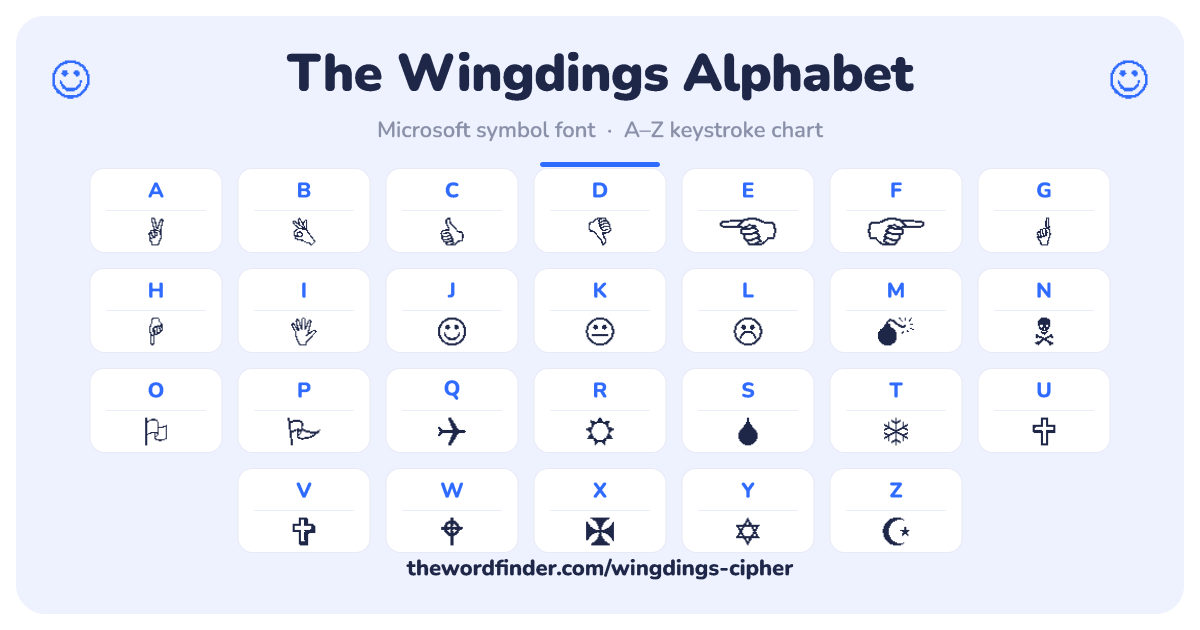
Common Wingdings Symbols
Most people who search for a single Wingdings symbol are inside Word or Google Docs trying to find which keystroke produces it. The table below lists the most-requested symbols, the key you press in the Wingdings font, and the font-independent Unicode character that works in any modern document.
| Symbol | Name | Keystroke | Unicode |
|---|---|---|---|
| ☺ | Smiley face | J | U+263A |
| ☹ | Frowning face | L | U+2639 |
| ✓ | Check mark | ü | U+2713 |
| ✗ | X mark | û | U+2717 |
| → | Right arrow | è | U+2192 |
| ← | Left arrow | ß | U+2190 |
| ↑ | Up arrow | á | U+2191 |
| ↓ | Down arrow | â | U+2193 |
| ♥ | Heart | Y | U+2665 |
| ★ | Star (filled) | « | U+2605 |
| ☐ | Empty checkbox | o | U+2610 |
| ☑ | Filled checkbox | þ | U+2611 |
| ● | Filled circle | l | U+25CF |
| ☠ | Skull and crossbones | N | U+2620 |
| ✌ | Victory hand | A | U+270C |
| 👍 | Thumbs up | C | U+1F44D |
What is Wingdings? A Short History
Wingdings was designed in 1990 by the type designers Charles Bigelow and Kris Holmes. Microsoft assembled it from three of their dingbat typefaces (Lucida Icons, Arrows, and Stars) and shipped it with Windows 3.1 in 1992, which is why the font has been preinstalled on Windows for more than three decades. A dingbat is an ornamental typeface made of symbols and shapes rather than letters, a printing tradition that long predates the computer.
The name itself is older than the font. "Wingding" is 1920s American slang for a lively, extravagant party or a flashy gesture, a sense Merriam-Webster still records. When Microsoft needed a playful name for a font of celebratory little symbols, the word fit. Today most of the symbols also exist as standard Unicode characters, so a checkmark or arrow no longer depends on the font being installed, which is the practical reason this translator outputs Unicode equivalents alongside the Wingdings keystrokes.
Wingdings 2, Wingdings 3, and Webdings
Wingdings is not the only symbol font Microsoft ships, and the differences trip people up. Wingdings 2 is a second Bigelow and Holmes set with more hands, checkboxes, and punctuation-style marks. Wingdings 3 is mostly arrows and geometric pointers. Webdings is a separate font, designed by Vincent Connare in 1997, the same designer behind Comic Sans, and its symbols lean toward web and media icons. They share the substitution idea but use completely different symbol sets, so a message typed in one will not decode correctly in another.
Wingdings and Undertale's W.D. Gaster
Players searching for a "Gaster translator" are usually after this tool. In the game Undertale, the hidden character W.D. Gaster speaks in a Wingdings-style font, so fans use a Wingdings translator to read his dialogue or write messages in his voice. For the character lore itself, the Undertale Wiki entry on W.D. Gaster is the deepest community reference, and we point there rather than duplicate it.
When to Use Wingdings (and When Not To)
Wingdings still earns its keep for puzzles, escape-room clues, themed worksheets, and party invitations, anywhere a message should look like a string of mysterious symbols. Teachers use it as a gentle first lesson in substitution before frequency analysis, and designers reach for single glyphs like the checkmark or arrow. For real documents, though, prefer the Unicode equivalents this tool provides, since they display correctly even on devices without the Wingdings font installed. For more decorative text styling, the Cursive Text Generator is a Unicode-based alternative.
Browse the full Cipher and Encoding Tools hub for more translators in the same family.
Frequently Asked Questions
Q: What is Wingdings? A: Wingdings is a dingbat font from Microsoft, made up of about 200 picture symbols that substitute for the usual letters, numbers, and punctuation. It was created in 1990 by the type designers Charles Bigelow and Kris Holmes, and it has shipped with Windows since version 3.1 in 1992.
Q: Who created Wingdings? A: Wingdings was designed by Charles Bigelow and Kris Holmes, the type designers behind the Lucida family. Microsoft built Wingdings from three of their dingbat fonts (Lucida Icons, Arrows, and Stars) and released it with Windows 3.1 in 1992.
Q: What does the word "wingding" mean? A: Before it was a font, "wingding" was 1920s American slang for a lively, extravagant party or a flashy gesture. Merriam-Webster still lists that meaning. Microsoft borrowed the playful word for its font of celebratory little symbols.
Q: How do I type in Wingdings? A: In Word or Google Docs, select your text and change the font to Wingdings, and each letter becomes its symbol. The easier route is to type your message into the translator above, press Encode, then copy and paste the result, which also gives you Unicode equivalents that display without the font installed.
Q: How do I read or decode Wingdings? A: Paste the symbols into the translator above and press Decode to get the plain text. If you have symbols but cannot tell which font or cipher produced them, a Cryptogram Solver uses letter-frequency analysis to crack any simple substitution without a key.
Q: What is the difference between Wingdings, Wingdings 2, Wingdings 3, and Webdings? A: Wingdings, Wingdings 2, and Wingdings 3 are three different symbol sets from the same designers, with Wingdings 3 being mostly arrows. Webdings is a separate 1997 font by Vincent Connare with web and media icons. Because each uses a different mapping, a message typed in one will not decode correctly in another.
Q: Is the Wingdings 9/11 "Q33 NY" conspiracy real? A: No. The claim that typing a flight number in Wingdings produces planes, a skull, and a Star of David is a coincidence, not a hidden message. The font was designed in 1990, eleven years before the 2001 attacks, by typographers with no connection to the events, and any random string of letters produces a random string of symbols. Snopes has the full debunk.
Q: Can I use Wingdings in Google Docs? A: Yes. Google Docs includes Wingdings, and you can also insert individual symbols through Insert then Special characters. For symbols that need to display reliably for other readers, use the Unicode equivalents this translator provides, since they do not depend on the Wingdings font being installed.
Q: Why does Word turn my Wingdings into emojis? A: Many Wingdings symbols now have official Unicode codepoints, and some apps auto-convert them to colour emoji. To keep the flat Wingdings look, apply the Wingdings font directly to the characters, or use the font-specific keystrokes rather than the Unicode emoji versions.
Q: What is the W.D. Gaster Wingdings reference in Undertale? A: In Undertale, the hidden character W.D. Gaster speaks in a Wingdings-style font, so fans use a Wingdings translator to decode his dialogue or write in his voice. The Undertale Wiki covers the character lore in depth.
Q: Where can I download the Wingdings font? A: Wingdings ships preinstalled with Windows and macOS, so most people already have it. Microsoft owns the font, so we do not host it for download; for licensing and availability details, see Microsoft's official typography pages. This translator works in your browser, so you can encode and decode without installing anything.
Q: Are there other fonts like Wingdings? A: Yes. Webdings is the closest Microsoft sibling, and Zapf Dingbats, designed by Hermann Zapf in 1978, is the original dingbat font that inspired the category. Unicode also has a dedicated Dingbats block, which is why many of these symbols now work without any special font.
Related Tools
- Pigpen Cipher — geometric monoalphabetic substitution; the Masonic cipher.
- Bill Cipher's Decoder — the symbol-substitution alphabet from Gravity Falls.
- Caesar Cipher Solver — Roman-era shift cipher; the simplest classical cipher.
- Atbash Cipher — ancient Hebrew reversal cipher, possibly the oldest cipher in continuously preserved text.
- Cryptogram Solver — solve arbitrary monoalphabetic substitution ciphers.
- Cursive Text Generator — Unicode-based decorative text styling.
- Morse Code Translator — translate text to Morse Code and back.
Feedback
If you liked using our decoder or want to share some suggestions, click the Feedback button below and fill out a simple form.
