
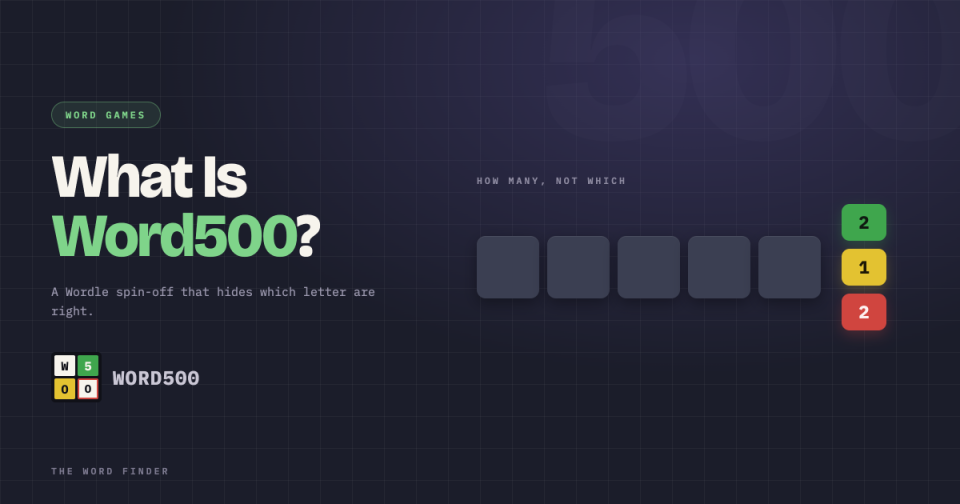
If Wordle has started to feel too easy, Word500 will fix that fast. It looks like Wordle at a glance: a five-letter secret word, coloured feedback, one puzzle a day. Then it removes the single thing that makes Wordle solvable. It refuses to tell you which letters are right.
That one change turns a gentle five-minute habit into a proper logic problem. Here is what Word500 is, how it works, how it differs from Wordle, and how to actually get good at it.
If you are here mid-puzzle rather than curious, our Word500 Solver takes the counts you have so far and returns every word still consistent with them. The rest of this explains what the game is doing and how to get better at it without help.
What is Word500?
Word500 is an independent, Wordle-style word game created by a developer who goes by Gabethebabe, and played at word500.com. You guess a hidden five-letter word, but you get eight attempts instead of Wordle’s six, and you will need them.
It is a newer, indie entry in the daily-puzzle wave that Wordle set off, and it is aimed at players who have outgrown the original. The site calls it a game “for power players,” which is marketing, but in this case also fair.
How Word500 works
The setup is familiar. There is a secret five-letter word, and you type guesses to close in on it.
The feedback is where everything changes. After each guess, Word500 shows you three counts: how many of your letters are in the word and in the right place, how many are in the word but in the wrong place, and how many are not in the word at all. What it does not show you is which letters those are.
So where Wordle colours each tile and hands you the answer letter by letter, Word500 just says, for example, that two letters are right but misplaced and three are wrong, then leaves you to work out which two. You are given the score, not the solution.
To help you think, the board lets you click any tile to cycle it through red, yellow, green and back, so you can map your own deductions, and there is an underscore key for holding a letter’s place while you puzzle out the rest.
Why it is so much harder than Wordle
The count-only feedback sounds like a small tweak. It is not.
In Wordle, information arrives already sorted. A green E in the second slot is a fact you can build on straight away. In Word500 the same guess might tell you one letter is green, but not that it is the E, and not where it sits. You have to run the logic yourself, cross-referencing guesses to work out which letter each count refers to.
That is genuinely hard to hold in your head, which is why the game gives you eight guesses and why plenty of players still miss. It also shifts the skill the game rewards, from vocabulary toward deduction and careful bookkeeping.
Game modes and features
Word500 is more than a single daily puzzle.
Daily gives everyone the same secret word each day, the mode most people play and share.
Practice lets you play unlimited random puzzles, which is the fastest way to learn the feedback system.
Archive opens past daily puzzles, so you can catch up or drill.
The game also runs in several languages and at different difficulty levels. On Standard difficulty the secret word never repeats a letter and some letters are excluded, which narrows the field. A Hint button will generate a word that fits all your clues so far, if you can resist it, and a Clear button wipes your colour markings so you can start the deductions fresh.
How to get good at Word500
Because the feedback is count-only, Word500 is really an information problem, the kind information theory was built to handle. Every guess is worth playing for how much it narrows the field, not just for whether it lands.
Three habits help most.
Open with a high-information word. A guess packed with common letters, like STARE, tests a lot of the alphabet at once and gives you the most useful counts to reason from. It is the same logic behind a strong Wordle opener, and it matters even more here.
Track your counts like a ledger. Note what each guess told you, using the tile colours to mark it, then look for the letter that must be doing the work across two guesses. The answer usually hides in the overlap.
Use the underscore key. Holding a position open while you test a letter elsewhere stops you wasting a whole guess.
Where to play Word500, and where to get unstuck
Word500 is free to play at word500.com, with a new daily puzzle in each language and difficulty setting.
When the counts stop adding up, our Word500 Solver does the deduction for you. You enter each guess you have made along with the three numbers the game returned, how many letters were correct and in position, how many were in the word but misplaced, and how many were absent. The solver holds every five-letter word in its list against all of that at once and shows you what survives.
That is the part worth explaining, because it is the part people try to do in their heads and lose. A single guess in Word500 rarely tells you much on its own. Two guesses that share a letter tell you a great deal, but only if you can hold both sets of counts in mind and work out which letter each number is describing. By guess four there are more combinations than anyone tracks reliably at eight in the morning.
The solver is not doing anything you could not do with a pencil and an hour. It is doing it in the ten seconds you actually have.
A word on using it at all. In a game with no opponent, a solver is a training tool. Watch which guess narrowed the field hardest and you start to see why, and after a couple of weeks you will open with better words and need the help later in the puzzle rather than earlier. Most people who use one regularly end up using it less.
If the count-only feedback turns out to be more grind than fun, our Wordle Solver covers the original game, Lingle is our own version with word lengths from four letters to seven, and our guide to the worst Wordle starting words covers which openers to keep out of either.
Frequently asked questions
What is Word500?
Word500 is an independent Wordle-style game where you guess a hidden five-letter word in eight tries. The twist is that it only tells you how many of your letters are correct, not which ones, which makes it much harder than Wordle.
How is Word500 different from Wordle?
Wordle colours each letter, so you learn exactly which letters are right and where. Word500 gives you only counts: how many letters are correct, how many are misplaced, and how many are wrong. You deduce which letters those are, and you get eight guesses instead of six.
Who made Word500?
It was created by an independent developer who goes by Gabethebabe, and it is played at word500.com.
Is Word500 free?
Yes. Word500 is free to play in a browser, with a daily puzzle plus practice and archive modes across several languages and difficulty levels.
What is a good starting word for Word500?
A word rich in common letters gives you the most to work with. STARE is a strong choice, which is why our Word500 solver uses it as its default opener. Early on the goal is to gather information, not to guess the answer.
Why is it called Word500?
The creator has not publicly explained the name. What is clear is the game itself: a harder, count-only spin on the five-letter daily word puzzle.
Is there a Word500 solver?
Yes. Our Word500 Solver takes the counts from each guess, how many letters are correct, how many are misplaced and how many are wrong, and returns every five-letter word still consistent with all of them.
How do I use the Word500 solver?
Enter each guess you have played along with the three numbers Word500 returned for it. The solver checks every candidate word against all your guesses at once and lists the ones that satisfy every count. Add each new guess as you play and the list narrows.
Why is Word500 harder to solve by hand than Wordle?
Wordle sorts the information for you. A green tile tells you which letter is right and where it sits. Word500 gives you only totals, so you have to cross-reference guesses to work out which letter each number refers to. That bookkeeping is what the solver removes.
Does the Word500 solver work for practice and archive puzzles?
Yes. The solver works from the counts you give it rather than from a specific day’s puzzle, so it handles the daily, practice mode and archive puzzles the same way.
