The Binary Code Translator converts plain text to binary code (the 0s and 1s that computers use to represent every character) and back. Type into the text field to encode, or paste binary into the lower field to decode. Both run in real time.
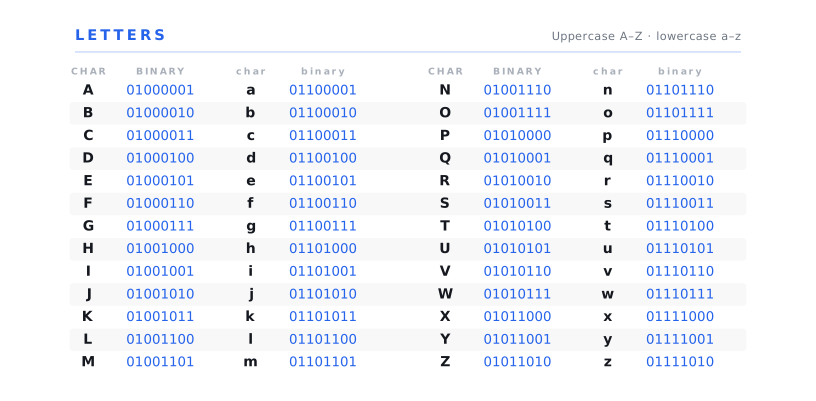
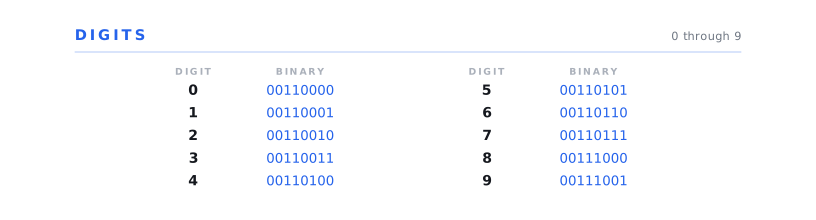
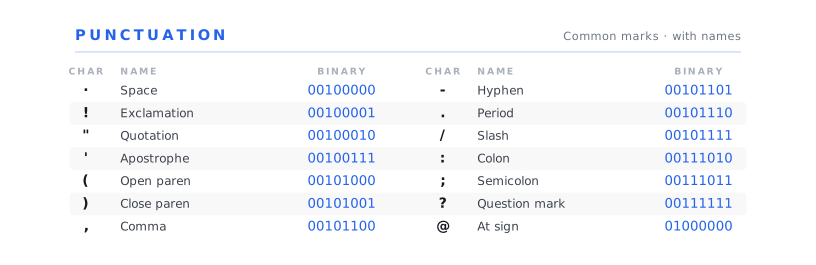
Binary Alphabet Reference Chart
Download the printable Binary Alphabet PDF — an easy-to-use single-page reference covering uppercase, lowercase, digits, and common punctuation. Free to use in classrooms, scout meetings, coding workshops, and hobbyist projects.
Use this chart as a quick lookup when you're decoding binary by hand or want to spot-check the translator's output. All values are 8-bit ASCII binary.
How the Binary Code Translator Works
The tool is fully bidirectional. Type into the text field and the tool encodes your message character by character into 8-bit binary. Each letter, digit, space, and punctuation mark becomes a sequence of eight 0s and 1s representing that character's ASCII value. Type into the binary field and the tool reverses the process — groups of eight bits are read off, converted back to their corresponding ASCII characters, and shown as plain text.
You can adjust the separator in the settings. By default the tool groups every 8-bit binary value with a space (01001000 01101001), but you can switch to commas (01001000,01101001) or no separator at all (0100100001101001). The encoding option lets you choose between strict 7-bit ASCII (the original American Standard Code for Information Interchange) and 8-bit UTF-8 (which covers ASCII plus the rest of the Unicode character set, including accented letters and non-Latin scripts).
If you want to try the tool quickly without thinking up a message of your own, click Sample to load a short example. The Copy button copies the current output to your clipboard; Clear empties both fields.
How Binary Code Works
Binary code is the base-2 number system, counting using only two digits, 0 and 1, instead of the ten digits (0–9) we use in everyday decimal counting. Each digit in a binary number is called a bit (short for "binary digit"). A group of eight bits is called a byte, and one byte can represent 256 different values (2⁸ = 256) — which is exactly enough to encode every letter of the English alphabet (both upper and lower case), every digit, every common punctuation mark, plus a wide range of control characters.
The standard that maps each English character to a specific byte is called ASCII (the American Standard Code for Information Interchange) published in 1963 and still the foundation of every modern text-encoding system. Under ASCII, the capital letter A is the binary value 01000001 (decimal 65), B is 01000010 (decimal 66), and so on through the alphabet. Lowercase letters start at 01100001 (a, decimal 97); digits 0–9 occupy 00110000 through 00111001 (decimals 48–57).
Modern computers use a richer encoding called UTF-8 that includes the original ASCII characters at the same byte values plus an extensive range of accented letters, non-Latin scripts (Greek, Cyrillic, Arabic, Chinese, Japanese, Korean, and dozens more), emoji, and historical scripts. For English-language text, UTF-8 and ASCII produce identical binary output; for non-English content, UTF-8 uses multi-byte sequences to represent each character.
The reason computers use binary code at all comes down to physics: the transistors and capacitors that make up a computer's circuitry have two stable states (on/off, high voltage/low voltage), so encoding information in two-state symbols is the most efficient possible match to the underlying hardware. Every text message, image, video, song, and webpage on your phone or laptop is, at the lowest level, a sequence of 0s and 1s — just like the messages this translator generates.
A Brief History of Binary Code
Binary arithmetic as a formal mathematical system dates to Gottfried Wilhelm Leibniz, the 17th-century German polymath who published the first full European treatment of base-2 arithmetic in 1703 in his paper Explication de l'Arithmétique Binaire. Leibniz framed binary not just as a useful counting system but as a philosophical one. He saw the duality of 0 and 1 as a representation of creation from void, and corresponded extensively with Jesuit missionaries in China who had observed similar binary structures in the I Ching's hexagrams.
Binary became a useful computational tool in the 19th century when the English mathematician George Boole developed what we now call Boolean algebra — a system of logic in which propositions can be combined using operations like AND, OR, and NOT, producing results that are either true (1) or false (0). Boole's foundational text An Investigation of the Laws of Thought (1854) is freely available via Project Gutenberg. Boolean algebra turned out to be the perfect mathematical formalism for describing the behaviour of electrical circuits — a fact recognised in 1937 by Claude Shannon, then a graduate student at MIT.
Shannon's 1937 master's thesis (later published) demonstrated that any logical or arithmetic computation could be performed by electrical relay circuits operating on Boolean principles — effectively establishing the mathematical foundation of every digital computer that has ever been built. His later 1948 paper A Mathematical Theory of Communication formalised information theory itself, introducing the bit as the fundamental unit of information and showing how binary encoding could represent any kind of communicable content — text, sound, image, video — within a unified mathematical framework. Modern computing is built directly on these foundations.
The specific binary-to-character mapping this tool uses — ASCII — was published by the American Standards Association in 1963 and revised in subsequent decades. UTF-8, the modern extension that handles the full Unicode character set, was designed by Ken Thompson and Rob Pike at Bell Labs in 1992 and has become the dominant text encoding on the web. For a deeper history of computing and information theory, James Gleick's The Information (2011) is the standard popular reference.
Where Binary Code Is Used Today
Every modern computer, smartphone, tablet, smart watch, smart speaker, and networked device uses binary internally to represent every piece of data it processes — text, images, video, sound, software code, and the network packets they're transmitted in. The visible computing layer (apps, websites, files) is built up of higher-level abstractions, but at the level of hardware operation, everything is binary.
Beyond computing, binary is the underlying representation in digital communication more broadly — telecommunications, satellite communication, digital broadcasting (TV and radio), GPS, Bluetooth, Wi-Fi, and cellular networks all encode signals as binary sequences. Astronomical and scientific data — including the famous Voyager Golden Records, designed to be decoded by extraterrestrial intelligence — use binary representations of images and sounds as a universal interlingua, on the assumption that any technological civilisation will recognise the base-2 system.
For most users, this tool's practical value is educational and recreational — learning what binary actually looks like, encoding short messages as a hidden-meaning party or classroom puzzle, decoding binary samples that appear in films, novels, or coding tutorials, and exploring the deep history of how modern computing represents human language at its lowest level. If you're interested in the closely related dot-and-dash signal-encoding system that preceded binary by about a century, our Morse Code Translator is the natural companion tool.
Frequently Asked Questions
Binary code is the base-2 number system — counting using only two digits, 0 and 1, instead of the ten digits we use in everyday decimal counting. Computers use binary because the underlying transistors that make up their circuitry have two stable states (on / off), so two-symbol encoding is the most efficient match to the hardware. Every letter, digit, image, sound, and video on a modern computer is, at the lowest level, represented as a sequence of 0s and 1s. For a deeper overview, see the Wikipedia entry on binary code.
Binary code is read in groups of eight digits — each group of eight bits is called a byte, and one byte represents one character. The first byte in the string 01001000 01101001 is 01001000, which is the decimal value 72 — the ASCII code for the capital letter H. The second byte 01101001 is decimal 105, which is the ASCII code for the lowercase letter i. So the full string decodes to "Hi". Use the A–Z binary reference chart above to look up specific characters, or paste any binary string into the tool above to have it decoded for you instantly.
Each character in the text is looked up in the ASCII (or UTF-8) character table and replaced with the 8-bit binary value for that character. The letter A is 01000001, the letter B is 01000010, the digit 0 is 00110000, the space character is 00100000, and so on. The translator handles this lookup automatically in both directions — type into the text field to encode, paste binary into the binary field to decode.
The capital letter A is 01000001 in 8-bit ASCII binary (decimal 65). The lowercase letter a is 01100001 (decimal 97). The word "Hello" in 8-bit binary is 01001000 01100101 01101100 01101100 01101111 — that's H, e, l, l, o, with each character represented by its 8-bit ASCII value, separated by spaces. You can confirm any character lookup by typing the text into the translator above.
Because the physical components of a computer — transistors, capacitors, magnetic storage, optical media — all have two stable states: on or off, high voltage or low voltage, magnetised or demagnetised, light or dark. Encoding information as 0s and 1s is the most efficient possible match to that two-state hardware, which means binary is also the most reliable encoding for storage and transmission. Modern computing rests on this foundation — see Claude Shannon's 1937 master's thesis for the seminal mathematical demonstration that any logical or arithmetic computation can be performed by binary electrical circuits.
Closely related but not identical. Binary code is the broad term for any data represented as 0s and 1s. Machine code specifically refers to the binary instructions that a particular computer's processor (CPU) can execute directly — add this number to that number, fetch a value from memory, jump to this address, and so on. All machine code is binary, but not all binary is machine code: a text message, an image file, or a music file are all stored as binary but they're data, not executable instructions. The binary produced by this translator is text data (ASCII / UTF-8 character encoding), not machine code.
The first formal European treatment of base-2 arithmetic was published by Gottfried Wilhelm Leibniz in 1703 in his paper Explication de l'Arithmétique Binaire — though Leibniz himself noted that binary structures had been observed centuries earlier in the I Ching's hexagrams. George Boole developed Boolean algebra in 1854, providing the mathematical framework that connects binary to logical reasoning. Claude Shannon demonstrated in 1937 that Boolean binary logic could be physically implemented in electrical relay circuits, establishing the foundation of every digital computer that has been built since. The specific binary character encoding this tool uses, ASCII, was published by the American Standards Association in 1963. See the A Brief History of Binary Code section above for the full account.
Both are signal-encoding systems for representing text as sequences of two basic units, but they differ in structure and purpose. Morse code uses two signal lengths (the short dit and the long dah) plus carefully timed gaps to encode each letter as a variable-length sequence — the letter E is one short pulse, the letter Q is four pulses (long-long-short-long). Morse was designed for human transmission and reception over telegraph wires and radio in the 19th century. Binary code uses exactly two symbols (0 and 1) and a fixed-length representation — every character is exactly 8 bits in ASCII / UTF-8 binary. Binary was designed for machine processing by electronic computers in the 20th century. If you're working with telegraphic or radio signals, our Morse Code Translator is the right tool.
Yes — the translator handles the full UTF-8 character set, which includes accented letters (é, ñ, ü, etc.), non-Latin scripts (Greek, Cyrillic, Arabic, Chinese, Japanese, Korean, and many others), and emoji. UTF-8 represents non-ASCII characters as multi-byte sequences — the letter é is 11000011 10101001 (two bytes); a typical emoji is three or four bytes. The translator handles the byte grouping automatically, but the output for non-English content will be noticeably longer than for plain English text.
Type your name into the text field of the translator above and the tool will display the 8-bit binary equivalent character by character. For example, the name "Sam" in 8-bit binary is 01010011 01100001 01101101 — that's S (01010011), a (01100001), m (01101101). The capital letters and lowercase letters have different binary values (capital S is 01010011, lowercase s is 01110011), so the case of your name affects the output. The reference chart above the FAQ shows every uppercase letter from A–Z.